PR0TA for Adobe Premiere Pro
Transparent AI editorial workflows directly from the sequence. Upload from Premiere, generate with visible model choices, and return approved results without breaking the edit.
Free with any PR0TA account. Bundled FFmpeg included. Built for professional editorial teams. v1.0.0
A Premiere-native round-trip for professional editorial.
Work from the sequence, generate with visible tool choices, and return approved work to Premiere without turning editorial into a manual export loop.
Select from the sequence
Work from the Premiere timeline and upload exactly the clip context you want PR0TA to process.
Generate with PR0TA
Run video, motion transfer, lipsync, and audio workflows from the same shared project and model stack.
Return to editorial
Pull the result back into Premiere so the editor stays in the cut, not in a detached export utility.
Professional editorial tooling, not a novelty panel.
The Premiere plugin keeps sequence work tied to the same transparent PR0TA project system your team already shares.
Editorial workflows
- Timeline clip upload
- Motion transfer and stylization
- Video-to-video generation
Audio and voice
- Lipsync workflows
- Voice and audio generation
- Project-linked audio assets
Project continuity
- Shared PR0TA library
- Queue and progress tracking
- Results ready for editorial handoff
Team operations
- Shared projects
- Cloud-synced assets
- Reviewable production context
Inside the Premiere workflow.
The Premiere plugin is the editorial entry point. The generation stack stays visible, and the production context stays connected for editors, artists, and reviewers.
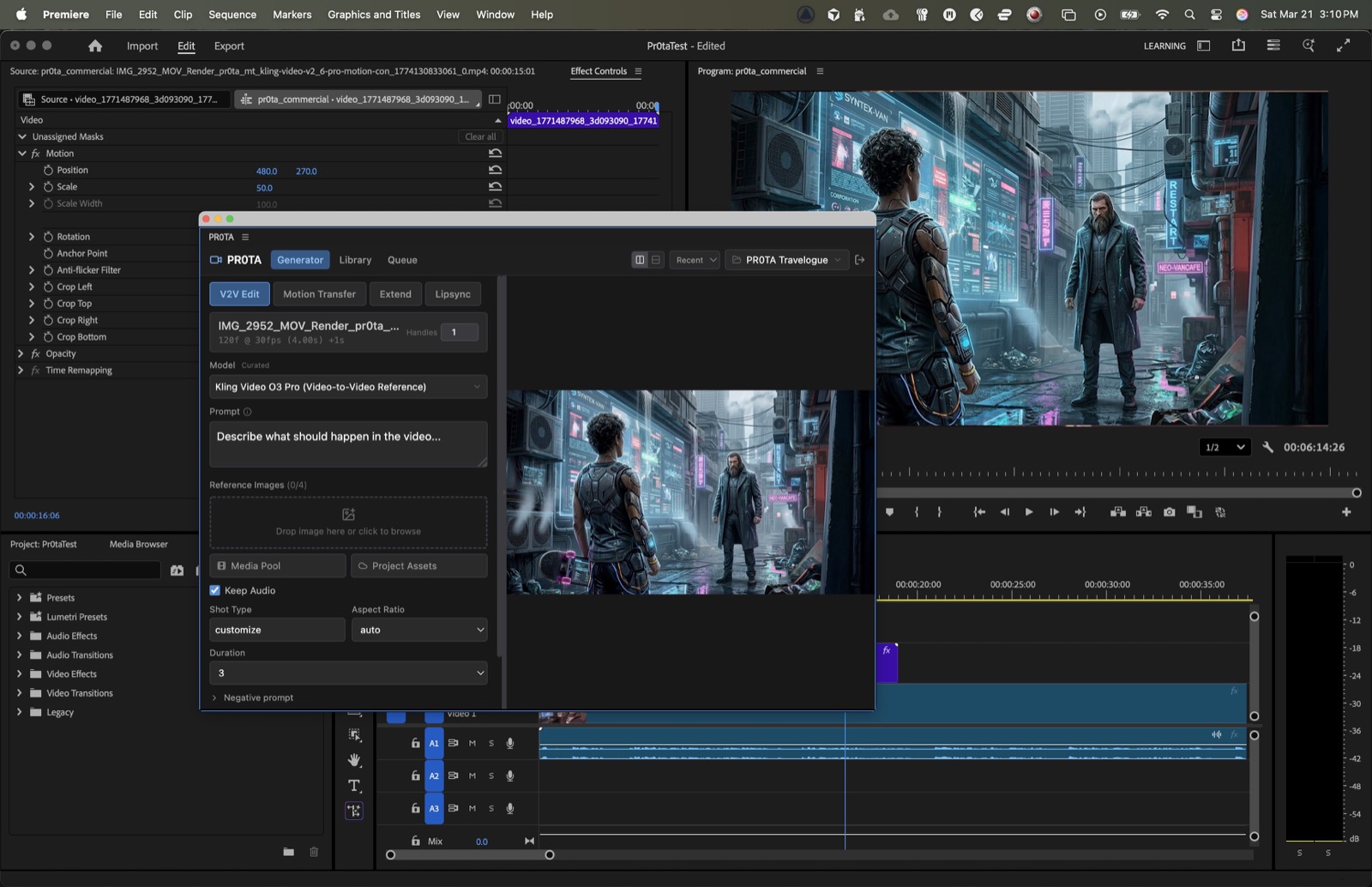
Generate directly from the cut
Select a clip in Premiere, launch a PR0TA generation workflow, and see the timeline context mirrored inside the panel.
Requirements
Installation
- 1.Download the Windows package
- 2.Extract the archive
- 3.Run
install.bat - 4.Restart Adobe Premiere Pro
- 5.Open Window → Extensions → PR0TA. If needed, check Extensions (Legacy).
Free to download. Built for professional editorial teams.
Start with a free PR0TA account, keep the sequence connected to the project, and scale into deeper collaboration as the production grows.