PR0TA for DaVinci Resolve
AI video, audio, and voice — right inside your timeline. Generate, iterate, and share with your team without leaving Resolve.
Free with any PR0TA account — 250 credits included. v1.0.0
The seamless back-and-forth.
Edit in Resolve. Generate in PR0TA. Results land back in your timeline. The whole project is shareable with your team.
Extract from timeline
Select clips directly from your Resolve timeline. The plugin handles export and upload automatically.
Generate with 150+ AI models
V2V, motion transfer, video extension, lipsync, voice changing — choose your model and go.
Results inject into timeline
Completed generations automatically appear in your Resolve media pool, ready for the edit.
Everything you need in the edit.
Full PR0TA power, native in Resolve.
Video
- V2V generation
- Motion transfer
- Video extension
Audio
- Lipsync
- Voice changing
- AI audio design
Workflow
- Queue management
- Asset library
- Real-time progress & auto-timeline injection
Collaboration
- Shared PR0TA projects
- Team access
- Cloud-synced assets
See it in action.
A full AI production suite, native inside DaVinci Resolve.
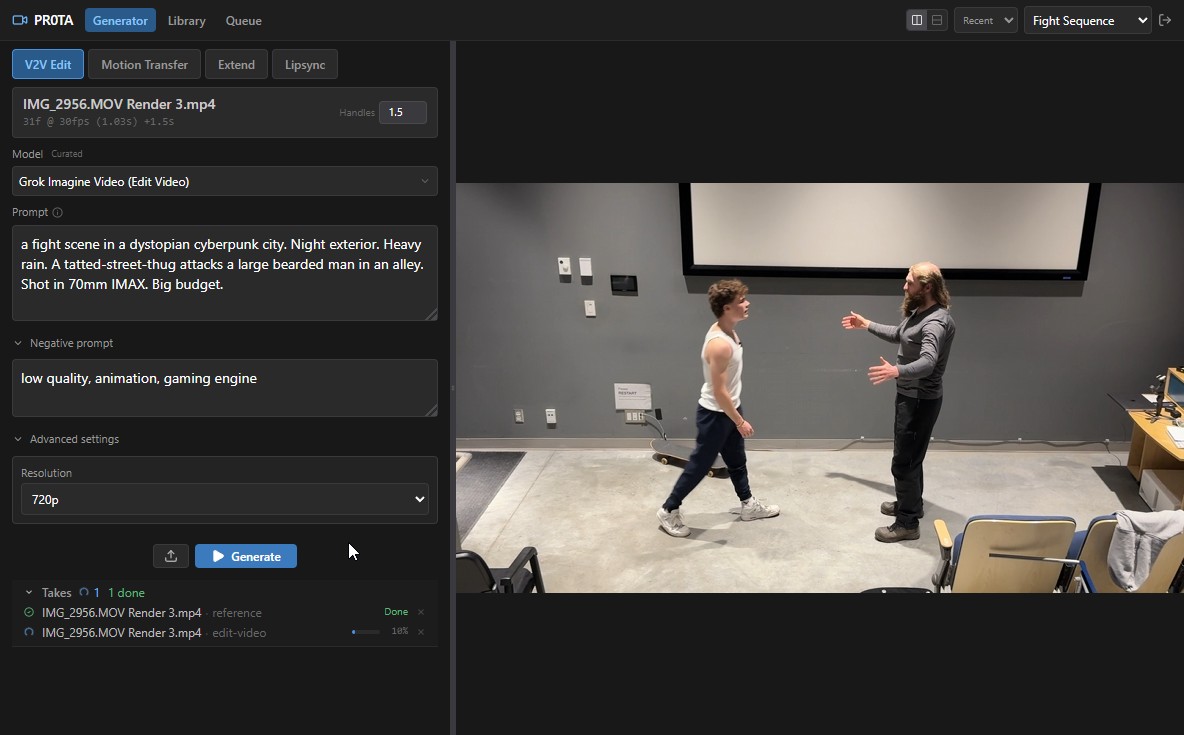
Video-to-Video editing
Select a clip from your timeline, describe the transformation, and generate. 150+ models at your fingertips.
Requirements
Installation
- 1.Download the Windows package
- 2.Extract the archive
- 3.Right-click
install.batand select "Run as administrator" - 4.Restart DaVinci Resolve
- 5.Go to Workspace → Workflow Integrations → PR0TA for DaVinci Resolve
Free to download. 250 credits included.
Every free account comes with 250 starter credits and 1 GB of storage — enough to start generating right away. Upgrade for more credits, storage, and discounted generation costs.
View Pricing